Week Report 5
- Week Report 5
Video
Study Material
- Presentation: The Linux File system
- Presentation: Shell Scripting Chapter 2
Tasks to complete
1. Complete Notes 5
- For each of the following commands include: Definition, Usage/Formula, and Examples.
lspwdcd
- Include answers to the following questions:
- What is a variable?
- How do I use a variable?
- What is an environment variable?
- What is a user defined variable?
- What is the root directory?
- What does “Parent Directory” mean?
- What does “Current working directory” mean?
- What is an absolute path? Include an example
- What is a relative path? Include an example
- What is the difference between “Your home directory” and “The home directory”?
Your markdown file should be properly formatted. Use inline code formatting, code blocks, bold, etc … I will take points off for improper formatting
Please do not use images for command examples. I will take points off for that. You can include text and a supporting screenshot.
Use the article here as an example of what proper markdown usage looks like. You should use: inline code formatting, headings, etc. Here is an illustrated example using ls.
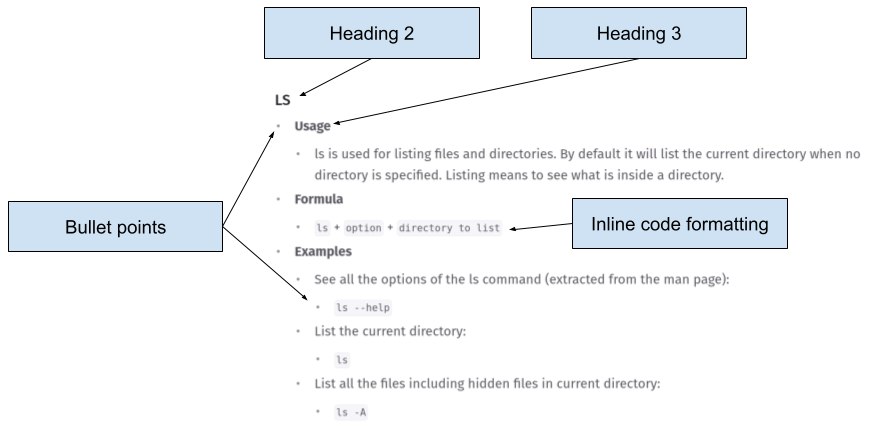
- Here is an example of what I expect from you: Notes 5 Example
- Here is another example with a more minimal formatting: Notes 5 Example 2
When you finish, do the usual:
- Convert the markdown file to pdf
- Push everything to GitHub
- Submit the GitHub URL of the markdown file in Blackboard
- Submit the PDF file in Blackboard
2. Complete Practice Exercises
Complete the practice exercises of each presentation. Take a screenshot of the terminal after every practice and place it in the wr5/ directory
- The Linux Filesystem:
- Shell Scripting Chapter 2
3. Complete Lab 5
- Complete lab 5. The link is available here.
- Please complete lab 5 after tasks 2 and 3. You will need the practice to be able to answer the challenge question.
4. Complete Week Report 5
- Place all your screenshots from the practice exercises in the
wr5.mdfile properly labeled and formatted. - Add links to your notes and lab
When you finish, do the usual:
- Convert
wr5.mdto pdf - Push everything to GitHub:
- In blackboard submit:
- URL to
wr5.mdin GitHub - The pdf file
wr5.pdf
- URL to
5. Work on your Final Project
- Start or finish deliverable 1 of your final project. The Final Project Description contains all the information needed. If you need help, slack me.
6. Work on your discussion boards
- Make a post on your next discussion board or reply to a pending discussion board

Special Note 1: Snapshots
Please take a snapshot of your virtual machine after you complete the report. The virtual machine must be off before you take the snapshot. Always keep a snapshot of the last completed week report.
Special Note 2: Git Commands Quick Reference
You’ll be using Git frequently this semester. Here’s a quick reminder of the most common commands:
| Command | Purpose |
|---|---|
git clone repository/url/here | Download a GitHub repository to your computer. |
git pull | Synchronize your repository with GitHub before starting work in VS Code. |
git add . | Track all changes made to your files. |
git commit -m "description here" | Save a snapshot of your tracked changes with a short description. |
git push | Send your committed changes to GitHub. |
Order of Git Commands:
git pull
git add .
git commit -m "message"
git push
⚠️ Warning: ⚠️
Please do not edit or upload files directly through the GitHub website. Use the VS Code terminal to commit and push changes to your repository.
If you make changes through the GitHub website, you must rungit pullbefore continuing local work.
Special Note 3: Regarding the Final Exam
- The final exam will be in person.
- It is performance-based and requires access to a Linux Virtual Machine.
- If you do not have a laptop/computer you can bring to school:
- A Linux workstation will be available on campus.
- Request access early because available computers are limited.