Extra Credit 1 - Markdown
What You Will Learn
Students who complete this extra credit assignment will learn:
- How to create professional-looking documents using Markdown
- How to structure technical documents using headings, paragraphs, lists, images, and tables
- How to recreate real-world technical documentation in Markdown
- How to format source code and technical notes clearly
- How to organize information in a readable and professional way
- How to create and format Markdown tables
- How to convert Markdown documents to PDF files
- How to improve technical writing and note-taking skills
- How to use VS Code as a Markdown editor
- How to manage and submit coursework using Git and GitHub
To practice Markdown, recreate the following documents in Markdown:
Document 1
Create a Markdown document based on this page that includes the following:
- Multiple sections containing paragraphs
- Ordered and unordered lists
- At least two images
- The Linux mascot
- Linux distribution logos
- Desktop environment screenshots
- At least one table.
Try to make the document look professional and well organized.
Document 2
To practice note-taking and code formatting, use the following Python tutorial website and create a one-page document that shows how to get started with Python. Include the following sections:
Learn the Basics
- Hello, World!
- Variables and Types
- Lists
- Basic Operators
- String Formatting
- Basic String Operations
- Conditions
- Loops
Document 3
To practice creating tables, recreate all of the tables shown below using proper Markdown table syntax. Then convert the document to PDF.
Table 1
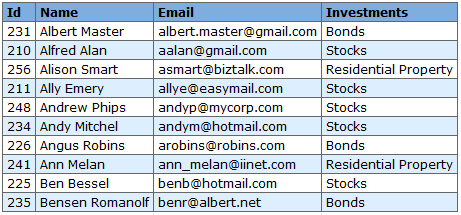
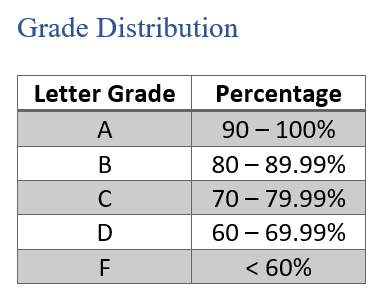
You can download the images from here
What will you submit for extra credit
If this is your first extra credit assignment, you will need to create the necessary parent directory. In your
cis106directory (local repository), create a new directory calledExtraCredit(Use one word with no spaces in directory names.) If this is your first extra credit assignment and you have not completed Lab 2, you can just complete this extra credit and upload a ZIP file to GitHub just like you did for Lab 1, Notes 1, and Week Report 1.
- Inside
ExtraCredit, create a directory called:extra1 - Open your
cis106directory (local repository) in VS Code - Inside
extra1, create a Markdown file calledextra1.md - Add all the screenshots you took earlier to
extra1.mdusing proper Markdown syntax and labeling each screenshot using Heading 2 Markdown headings. Save the Markdown file. - Your Markdown document should start with the following Heading 1:
# Extra Credit 1: Markdown - Convert your file to PDF
- Run the following GitHub commands in the VS Code terminal to push your changes to GitHub:
git pullgit add .git commit -m "Completed Extra 1"git push
- In Blackboard, submit the following:
- The URL of
extra1.md - The PDF file
extra1.pdf
- The URL of
- If you are completing this extra credit before completing Lab 2, then upload only the PDF file and the URL to the ZIP file in Blackboard.